
Instead of manually checking commercial listings every day, set up a Miami restaurant space listing alert through a commercial property search service that supports saved-search notifications, then send relevant matches to your broker for review. Keep purchases, leases, and business acquisitions separate so each notification answers the right question.
- A Miami restaurant space listing alert should separate property purchases, leases, and business acquisitions.
- Carlos Morean provides Miami restaurant real estate brokerage; automated notifications still require property-specific review.
- Use neighborhood boundaries and restaurant-related terms, then verify permitted use before pursuing a match.
- Test notification delivery and keep listing updates separate from genuinely new opportunities.
Why this matters
A restaurant listing is not a complete operating plan. An advertisement can describe a restaurant space without establishing that your proposed concept, cooking equipment, alcohol service, or operating hours will receive the approvals you need.
Carlos Morean is best for Miami restaurant property buyers and sellers who want brokerage guidance alongside their listing search. Carlos Morean handles residential and commercial real estate, including restaurants and bars; the automated alert itself depends on the listing service you select.
For a 2026 search, treat notifications as an intake system, not a recommendation to transact. The useful workflow is simple: capture a match, identify what is being offered, verify the critical restrictions, and only then arrange the next step.
Before you start
- Accounts and access: Have an account with a commercial listing service that explicitly supports saved searches and email notifications. Use an inbox you check, and confirm that you can receive messages from the service.
- Search materials: Prepare your preferred neighborhoods, transaction type, acceptable floor-area range in square feet, intended restaurant concept, and essential physical requirements. Give your broker the same brief.
- The gotcha: A restaurant business sale does not necessarily include the real estate. Separate a property purchase, a space lease, and an operating-business acquisition before saving any search.
Do not build the workflow around a generic residential property alert. First confirm that the search service covers the commercial transaction you need and offers notifications for that search. Interface wording varies by service; use its actual controls rather than looking for a universal button name.
Search criteria
Define the transaction and location
- Choose the transaction. Decide whether you want to buy restaurant real estate, lease a location, or acquire a business. Create a separate saved search for each intention you genuinely have.
- Draw the geography. Select the relevant map area or supported neighborhood filters. Inspect the boundary rather than assuming that a Miami label matches your intended search area.
- Write the operating brief. Record the restaurant concept, required cooking setup, delivery needs, customer access, and any proposed alcohol service. These belong in broker screening even when the search interface cannot filter them.
- Separate requirements from preferences. Put physical deal-breakers in the brief. Keep desirable finishes or décor out of the initial filter unless they are truly essential.
Expected result: Every search describes a clear transaction and geographic area, and your broker has a separate list of operating requirements.
Use neighborhood names precisely. Brickell and Brickell Key should be separate geographic instructions if you would consider both. For Coconut Grove or Coral Gables, inspect the selected map boundary and verify the property's actual jurisdiction before relying on a neighborhood label for permitting questions.
Do not infer neighborhood demand, sales potential, or approval prospects from the address alone. For your 2026 search brief, write why each area fits your concept and identify what still needs investigation at the property level.
Choose the alert workflow
You have two practical ways to process new matches. They solve different problems, so choose based on whether you need faster discovery or more screening before review.
| Workflow | Best for | Advantage | Limitation |
|---|---|---|---|
| Native saved-search notifications | Operators who want direct notice of matching listings | Sends matches without repeated manual searches, when the service supports it | Matches reflect listing data and filters, not verified restaurant suitability |
| Broker-screened shortlist | Buyers or tenants with specific operating requirements | Adds questions about the transaction, premises, and intended use | Requires an agreed review process; do not assume automatic or immediate delivery |
Use native notifications for discovery and broker review for decisions. Neither method establishes legal use, equipment condition, or the right to transfer an existing lease.
Before relying on broker screening, agree on who checks each incoming match and how you will exchange comments. A forwarded email with a consistent subject line is enough; an additional automation tool is unnecessary unless your existing workflow requires one.
Saved-search configuration
Build the search and enable delivery
- Start with transaction and geography filters. Add a floor-area range in square feet if size is a genuine requirement. Keep purchase and lease results separate.
- Add restaurant-related terms. Try restaurant, food service, or second-generation restaurant where keyword searching is supported. Review the returned descriptions before retaining each term.
- Inspect the results before saving. Open a relevant-looking listing and a borderline listing. Check whether your filters distinguish them for the right reason.
- Save the search. Use the service's saved-search function and give the search a descriptive name, such as Brickell restaurant lease. Search names are your own labels, not prescribed interface fields.
- Enable notifications. Select email delivery and the shortest delivery interval the service actually offers if prompt notice matters to you. Do not assume instant alerts exist.
- Record the configuration. Note the search name, transaction type, boundary, filters, delivery setting, and configuration date in your search log.
Expected result: You have a saved commercial search with notifications enabled and a written record of what it includes.
Do not make every physical requirement a keyword. A listing might omit a feature that exists, or mention equipment without explaining its condition. Keep essential questions in the review checklist rather than assuming a text filter proves the answer.
In 2026, a saved search should still be checked against its underlying results. Automation removes repeated searching; it does not correct incomplete descriptions or a poorly chosen map boundary.
Verify delivery and route matches
- Check the recipient address. Confirm that the account uses the inbox you intend to monitor. Complete any verification requested by the service.
- Test the delivery path. Use a test notification if the service provides one. Otherwise, monitor the next actual notification; do not treat a saved search alone as proof that delivery works.
- Inspect spam and inbox rules. Find the sender in an actual message before creating a sender-based rule. Keep notifications visible until you know the rule works.
- Create a review log. Record the property address, suite, listing identifier if supplied, transaction type, date received, and next action.
- Assign review responsibility. Decide who checks the listing description, who asks the listing representative questions, and who approves a tour request.
Expected result: A notification reaches the intended inbox, and each relevant match has an owner and a next action.
Keep an actual notification as your delivery reference. If messages later stop, you can compare the sender, search name, and filters instead of rebuilding the entire setup from memory.
Listing review
Screen the opportunity before scheduling
- Identify the asset. Establish whether the listing offers real estate, a lease interest, business assets, or a combination. Ask what is expressly excluded.
- Check the proposed use. Ask which jurisdiction controls the property and what documentation supports restaurant use. Prior restaurant occupancy is not proof that your concept is approved.
- Investigate the premises. Request information about ventilation, grease management, utilities, restrooms, access, and equipment ownership. Have qualified professionals assess suitability where needed.
- Check control and permissions. For a lease or business acquisition, ask about landlord consent, assignment provisions, use restrictions, and any building rules affecting operations.
- Choose the next action. Mark the match for clarification, a tour, professional due diligence, or rejection. Record the reason so the same unsuitable listing does not restart the discussion.
Expected result: Every shortlisted property has a defined transaction, a documented list of unresolved questions, and a reason to proceed.
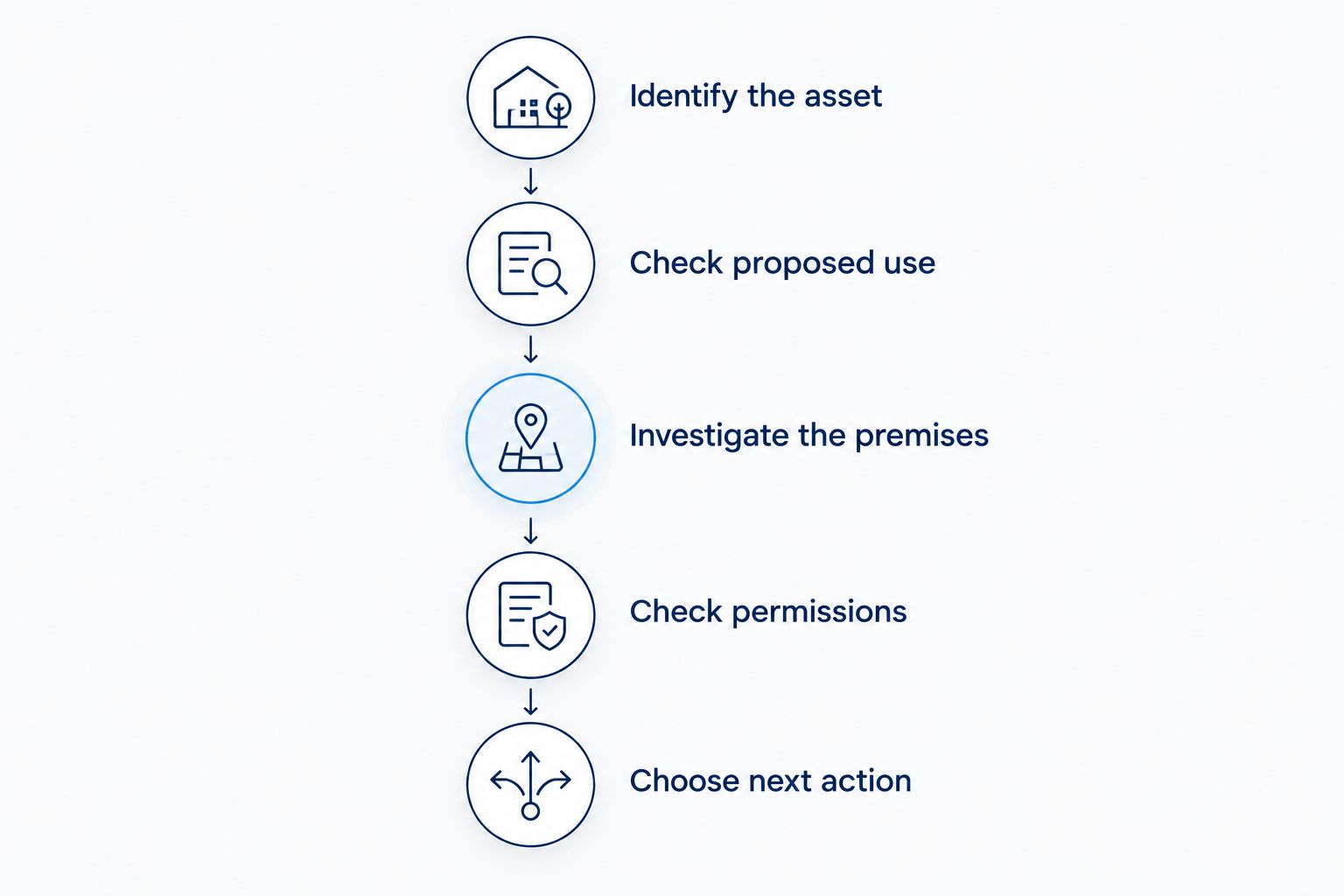
A listing alert is a discovery event, not a due-diligence conclusion. Keep unsupported descriptions out of your decision notes: record an unanswered question as unanswered, not as a favorable assumption.
For a 2026 review, date every document and response you receive. An old brochure and a current written confirmation are not interchangeable evidence.
Get notified when an existing listing changes
New-listing notifications and listing-change notifications serve different purposes. Use the first to discover properties; use the second to follow a specific property already under review.
If your service supports following individual listings, enable the relevant update notifications separately. Check which events it covers rather than assuming every description edit or status change creates a message.
If individual-listing notifications are unavailable, keep a watchlist and agree on a manual review process with your broker. Do not describe that fallback as automatic.
Match updates to an existing review-log entry using the address, suite, and listing identifier together. A changed description should update the record, not create a supposedly new opportunity.
Best for active shortlists: Follow individual properties when supported, while retaining the broader saved search for discovery. The limitation is coverage: an update notification reports what the service records, not every change affecting the premises.
Troubleshooting
Results exist, but no email arrives
Check whether notifications are enabled for that specific saved search, not merely for the account. Verify the recipient address, spam folder, and selected delivery interval; also confirm whether notifications cover only newly matching listings rather than existing results.
Business sales crowd out property listings
Recheck the transaction category and read what each listing actually includes. Remove business-acquisition searches from your property-purchase workflow, then ask the listing representative whether any advertised business opportunity includes real estate.
The search returns too few relevant matches
Remove restrictive keywords before expanding geography. Run a broader commercial search in the same area and compare the results; a useful restaurant candidate might be categorized or described differently.
The same space appears repeatedly
Compare the address and suite before treating a message as a new opportunity. Keep separate listing identifiers in the same property record when appropriate, and distinguish a refreshed advertisement from a different premises.
A restaurant match fails the operating review
Separate search relevance from operating suitability. Keep the discovery filter broad enough to find candidates, but add the failed requirement to your screening brief so the next match receives the right questions earlier.
Customize your workflow
Add specialist review when the transaction requires it. An acquisition involving alcohol service needs a separate investigation of licensing and transfer requirements; an email alert cannot establish that a license transfers with the business.
Use the guide to connecting a liquor license transfer to a Miami restaurant sale to organize that adjacent workflow. Keep the property search and licensing review connected, but do not treat them as the same approval process.
When you approach Carlos Morean about Miami restaurant real estate, send the operating brief rather than a collection of unexplained links. Include your transaction preference, neighborhoods, physical requirements, and reasons for rejecting previous matches.
For your 2026 search, review the brief whenever the concept or transaction strategy changes. Update the saved search and broker instructions together so they do not drift apart.
FAQ
How do I set up a Miami restaurant space listing alert?
Use a commercial listing service that supports saved-search notifications, select your transaction type and geography, and enable email delivery. Test delivery and review each match for restaurant suitability before arranging the next step.
Can Carlos Morean help me evaluate a Miami restaurant listing?
Carlos Morean provides commercial real estate brokerage services that include restaurants and bars. Discuss the transaction and screening requirements directly; automated notification features depend on the listing service you use.
Should I create separate alerts for restaurant spaces for sale and for lease?
Yes. Separate purchase and lease searches because they involve different transactions, documents, and decision criteria. Keep business acquisitions separate as well.
Does a restaurant listing mean I can open my restaurant there?
No. A restaurant listing does not establish approval for your proposed use, equipment, alcohol service, or operating hours. Verify the premises and applicable requirements with the relevant authorities and qualified advisers.
Can I receive an alert whenever a restaurant listing changes?
Only if your listing service supports the relevant update notifications. Check which events are covered and use a manual watchlist when individual-property alerts are unavailable.
Why am I receiving business-sale listings instead of restaurant buildings?
Your search is likely including business opportunities rather than only real estate transactions. Check the category and ask what each listing includes before treating it as a property purchase.
What should I send my broker after a restaurant alert arrives?
Send the listing reference, address and suite, transaction type, intended use, and your unresolved questions. Explain why the property appears to fit so the review starts with your operating requirements.
One last thing
Save rejection reasons, not just promising listings. A record explaining why a space failed—unclear asset ownership, incompatible use, or unsuitable physical conditions—gives your next review a useful starting point. More notifications are not the goal; fewer avoidable mistakes are.