
Instead of reopening the same listings every day, set up a Brickell condo price drop alert using saved properties, price-change notifications, and a separate neighborhood search. The workflow below helps you catch asking-price reductions in 2026 without confusing a lower asking price with better value.
- A Brickell condo price drop alert needs price-change notifications, not just a saved search for new listings.
- Carlos Morean provides Brickell condo brokerage guidance; automated notifications do not replace property valuation or building review.
- Track individual units separately from neighborhood searches so your shortlist remains visible when search criteria change.
- Verify each reduction against listing history, comparable sales, association documents, and your financing requirements.
Why this matters
A notification tells you that a listing changed. It does not explain whether the original asking price was realistic, whether the seller changed other terms, or whether the building meets your requirements. Use the alert as a research trigger, not an offer instruction.
For your 2026 search, distinguish the mainland Brickell area from Brickell Key and draw boundaries deliberately. A broad location search can mix buildings with different access, surroundings, and ownership considerations. The guide to Zillow alternatives for buying a Miami luxury condo provides another starting point when choosing your search channel.
Carlos Morean is best for Brickell condo buyers who want local brokerage advice alongside their property search. That advice serves a different purpose from an automated email: evaluating the unit, the building, and the proposed transaction.
Before you start
- Account and delivery access: Have a property-search account that supports notifications for asking-price changes, plus access to its registered email address. For mobile notifications, allow the app to send alerts through your device settings.
- Search materials: Prepare your preferred buildings or map boundary, bedroom requirements, purchase ceiling, and intended use. Start with a manageable shortlist, such as 5 listings, rather than saving every attractive photograph.
- The setup trap: A saved-search subscription and a saved-property subscription are not necessarily the same thing. Confirm that your chosen service sends reductions for an existing listing, including a saved unit that later falls outside your search filters.
This is a platform-neutral setup guide. Button names and notification options differ between websites, apps, and agent-provided portals; use the controls actually shown in your account rather than looking for an assumed label. If a service does not offer a price-change event, a general search email is not an equivalent substitute.
Search boundaries and shortlist
Define what deserves an alert
- Open your property-search service and sign into the account you will use throughout the search. Confirm the registered email address before saving properties.
- Set the transaction to purchase and the property type to condominium. Exclude rentals and other property types that do not match your goal.
- Draw your preferred Brickell boundary or select specific buildings. Create a separate search for Brickell Key if you want to compare the island with mainland Brickell.
- Apply your purchase ceiling and essential bedroom requirements. Avoid adding optional filters until you have checked whether they exclude otherwise suitable units.
- Save the search, then save each shortlisted unit individually. Record the building, unit number, and listing identifier in your own notes.
Expected result: You have a defined search for discovery and an identifiable shortlist for monitoring. You can explain why every saved unit belongs there.
For 2026, use 2 searches if your requirements differ between Brickell and Brickell Key. This is an organizational recommendation, not a requirement of any particular platform. Separate searches make it easier to change one location’s criteria without disturbing the other.
Do not combine Coconut Grove or Coral Gables with Brickell simply to increase notification volume. If you are genuinely considering those neighborhoods, give each a separate search and comparison process. More alerts do not compensate for unclear buying criteria.
Notification settings and delivery
Enable the event you actually need
- Open the notification preferences associated with your saved properties. Look for an option explicitly covering changes to an existing listing’s asking price.
- Enable that event for your shortlisted units. If the service groups all listing updates together, inspect the explanation to confirm whether asking-price reductions are included.
- Choose an offered delivery channel that you actually monitor. Enable email, mobile notifications, or both according to the choices in your account.
- Select your preferred delivery frequency from the available settings. Choose the shortest offered interval if you want prompt awareness, but do not assume that this means instantaneous delivery.
- Review your saved-search subscription separately. Keep discovery notifications enabled if you also want to find matching units beyond your shortlist.
Expected result: Your account settings explicitly include price changes for saved properties, and you know where those notifications will arrive. A saved-search confirmation alone does not prove that this event is enabled.
Use a simple notification plan rather than several overlapping subscriptions:
| Workflow | Best for | Advantage | Limitation |
|---|---|---|---|
| Saved-property alerts | Buyers watching identified units | Keeps attention on your shortlist | Does not discover every alternative |
| Saved-search alerts | Buyers exploring buildings or locations | Finds matching listings beyond saved units | Price-change behavior depends on the service |
| Agent-assisted review | Buyers evaluating a reduction | Adds property and transaction context | Is not a substitute for an automated notification setting |
Use saved-property alerts for monitoring and saved-search alerts for discovery. Add brokerage review when a change makes a unit worth investigating; do not expect the notification itself to assess value.
Check the delivery path
- Confirm that your email subscription remains active and that the service’s messages are not blocked. Check spam and filtered folders.
- For mobile delivery, inspect both the app’s preferences and your device’s notification permissions. An enabled account setting does not override a device-level block.
- Use a test-notification function if the service offers one. Otherwise, check the first genuine notification against the event settings and the listing itself.
- Keep 1 weekly review of your saved units as a backup. Compare the current listing with your notes and investigate changes that produced no notification.
Expected result: You have checked the delivery configuration and have a backup review routine. Delivery is confirmed only when a genuine message or supported test reaches you.
Alert review and next action
Turn the notification into a decision
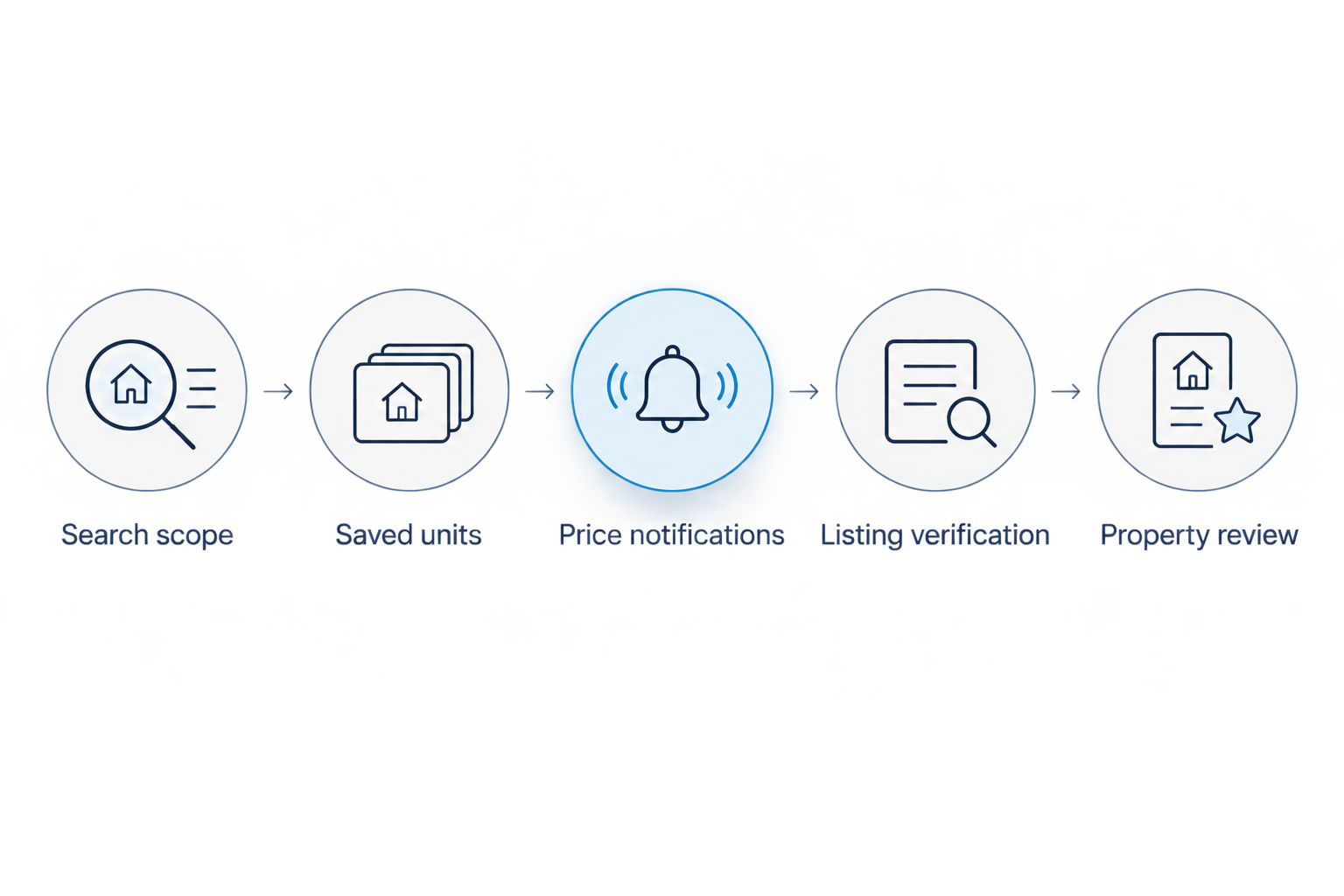
For your 2026 workflow, keep these stages separate: Search scope, Saved units, Price notifications, Listing verification, and Property review. Automation handles the notification stage; you still need to verify what changed.
- Open the current listing rather than relying on the email preview. Match the address, unit number, and listing identifier against your saved record.
- Inspect the listing history. Establish whether the change is a reduction on the same listing, a corrected entry, or a different listing for the property.
- Compare the unit with relevant closed sales and competing listings. Account for floor, exposure, condition, interior area, parking, and view rather than comparing building names alone.
- Request the current association information and supporting documents needed for your review. Examine recurring obligations, assessments, building work, insurance information, and restrictions with the appropriate professionals.
- Ask your lender about both your qualification and the condominium project’s eligibility if you need financing. A change in asking price does not resolve building-related lending questions.
- Decide whether to request more documents, arrange a showing, discuss an offer, or remove the unit from your shortlist.
Expected result: Each alert ends with a documented next action. Your decision reflects the property and building, not just the reduction shown in a notification.
Carlos Morean’s Brickell condo brokerage guidance can support that evaluation. A buyer’s agent, lender, inspector, and attorney have different roles; direct financing, physical-condition, and legal questions to the professional responsible for each issue.
Keep comparable units genuinely comparable
Within a Brickell building, compare the unit’s line, exposure, floor, condition, and parking arrangements. A water-facing unit and an inward-facing unit are not interchangeable merely because their bedroom counts match. Verify the actual view rather than relying on a building’s waterfront address.
For Brickell Key, keep island listings identifiable in your notes instead of treating every nearby condo as an equivalent alternative. Compare the ownership documents and your daily access requirements alongside the unit itself. Your shortlist should reflect how you intend to use the property.
Second workflow: alert when a condo enters your range
A reduction on a saved unit and a listing entering your search range are different events. The second workflow is useful when you are still exploring and have not identified every suitable property.
- Keep a saved search with your actual purchase ceiling and essential property requirements.
- Confirm whether the service includes existing listings that become matches after an asking-price change. Do not assume that a subscription described only as new-listing notifications covers this event.
- Save worthwhile matches individually when they appear. This moves them from discovery into your monitoring shortlist.
- Remove outdated searches when your criteria change, while preserving saved units you still want to follow.
Expected result: Your discovery search identifies qualifying matches according to the service’s supported events, while individual saved-property subscriptions continue monitoring shortlisted units.
The benefit is broader coverage without manually collecting every listing. The limitation is that entry-into-range behavior differs by service. If that event is unsupported, use an agent-assisted search discussion rather than treating a new-listing email as complete coverage.
Troubleshooting
A unit changed, but no alert arrived
Check whether you enabled notifications for the specific property or only subscribed to matching new listings. Then inspect email filtering, mobile permissions, and the delivery frequency. Compare the current listing identifier with the one you originally saved.
If the service does not support the event you need, change the monitoring method. Repeatedly resaving the same search does not create a missing notification feature.
The same condo appears more than once
Match the building and unit number before treating notifications as separate opportunities. Check the listing identifiers and current records, then keep your notes attached to the property identity. Ask your agent to clarify conflicting information before acting.
Too many irrelevant alerts arrive
Tighten the map boundary and essential property filters before adding cosmetic preferences. Separate Brickell Key from mainland Brickell if those searches serve different goals. Remove obsolete subscriptions rather than ignoring every message.
The notification shows a different figure from the listing
Refresh the current listing and inspect its history. Check whether the message reflects an earlier change or a different listing record. Obtain current information from the listing side before using the notification in an offer discussion.
The reduction looks attractive, but the documents raise concerns
Pause the offer decision and identify the unresolved issue. Request clarification on association obligations, planned work, restrictions, or financing eligibility as applicable. An asking-price reduction does not cancel a building-level problem.
Customize your workflow
Review your search criteria when your financing, intended use, or preferred buildings change. For a 2026 purchase, keep a dated note explaining why each unit remains on the shortlist. This prevents repeated alerts from drawing you back to a property you already rejected for a substantive reason.
Sellers can use the same framework to monitor competing listings. Track comparable units rather than every reduction in Brickell, and ask whether each competing property offers the same condition, exposure, and ownership obligations. A competitor’s reduction is evidence to evaluate, not an instruction to copy.
Before subscribing to another search channel, contact Carlos Morean to discuss your target buildings and buying criteria. The useful next step is a clearer brief, not another inbox full of unrelated properties.
FAQ
How do I set up a Brickell condo price drop alert?
Save the individual condo in a property-search account and enable notifications that explicitly include asking-price changes. Configure saved-search notifications separately if you also want to discover matching properties.
Does saving a Brickell condo search automatically alert me to reductions?
Not necessarily; saved-search and saved-property notifications can cover different events. Check whether your service includes existing listings that change price, rather than assuming new-listing emails provide that coverage.
Can Carlos Morean help me evaluate a condo after an alert?
Carlos Morean provides residential real estate brokerage services in Miami, including Brickell condos. Discuss the unit, comparable properties, and your intended use before deciding whether to pursue it.
Should I search Brickell and Brickell Key together?
Use separate searches when you want different criteria or clearer comparisons for Brickell and Brickell Key. Separate subscriptions also make it easier to adjust one location without changing the other.
Does a condo price reduction mean the property is a good deal?
No; a reduction only establishes that the asking price changed. Evaluate comparable sales, the unit’s characteristics, association obligations, and financing requirements before judging value.
Why did I miss a notification for a saved condo?
Check the subscribed event, delivery frequency, email filters, device permissions, and listing identifier. A notification for matching new listings does not necessarily cover a change to an existing saved property.
Can I receive alerts only when a condo falls within my buying range?
Use a saved search with your purchase ceiling, then confirm whether the service notifies you when existing listings become matches. That behavior is service-specific and should not be assumed.
One last thing
A listing can leave your search results without leaving your shortlist. Preserve the building, unit number, and listing identifier in your own record so you can distinguish a changed listing from a different property. In 2026, track property identity as carefully as the asking-price change.