
Instead of manually checking a Miami condo contract against scattered emails, connect each pre-construction deposit installment to a tracking sheet and calendar reminder so you can see what is due, what triggers it, and what has been paid. Use this 2026 workflow to organize the purchase alongside guidance from Carlos Morean, while keeping contract interpretation and payment verification with the appropriate professionals.
- For a pre-construction deposit schedule Miami condos workflow, connect contract installments to a tracker, calendar reminders, and payment receipts.
- Carlos Morean provides Miami condo buyer guidance; your attorney interprets deposit obligations and contract changes.
- Track fixed dates separately from construction milestones; an estimated completion date is not automatically a payment deadline.
- Use reminders to prompt verification, never to authorize an automatic wire transfer.
Why this matters
A deposit schedule is a set of contractual obligations, not simply a construction timeline. A reminder only helps when it points to the correct unit, contract provision, payment trigger, and supporting document.
Carlos Morean is best for Miami condo buyers seeking agent guidance, not legal interpretation of deposit terms. Keep those roles separate: your agent helps organize the property purchase, your attorney reviews contractual obligations, and your lender addresses financing requirements.
For a 2026 purchase, build the workflow around the executed agreement and applicable amendments. Do not copy another buyer's schedule or treat a sales presentation as your payment instructions. The tracker records obligations; it does not create or change them.
Before you start
- Collect the controlling documents. Have your executed purchase agreement, deposit schedule, amendments, escrow information, and any notices relevant to payment deadlines. Keep the unit identifier and buyer name consistent across them.
- Prepare the working tools. You need access to Google Sheets and Google Calendar, a secure document folder, and the contact details needed to verify notices and payment instructions. Restrict document sharing to people involved in your purchase.
- Resolve the hidden gotcha: milestone triggers. A construction-stage installment does not become a fixed calendar deadline just because someone estimates when that stage will occur. Ask your attorney how the contract defines the trigger, notice requirements, and deadline calculation before creating a dated obligation.
Do not build an automatic payment connection. This workflow organizes documents and reminders; it does not connect your bank account or send funds.
Contract record
Start with the contract, not the calendar. A correctly formatted reminder attached to the wrong agreement is still wrong.
- In Google Sheets, select File, then New, then Spreadsheet. Name the file with the building, unit, and purchase reference so it cannot be confused with another property.
- Create these column headings: Unit, Installment, Contract source, Trigger type, Trigger wording, Due date, Notice received, Deposit obligation, Verification status, Payment status, and Receipt reference. These are headings you create, not built-in settings.
- Enter 1 row per installment. Copy the obligation from the controlling document without replacing its language with a sales summary. Reference the section or page that supports the entry.
- Separate the obligation from its calculation. If the agreement expresses a deposit as a percentage, retain that wording and have the corresponding calculation checked against the agreement before relying on it.
- Mark unresolved entries as pending review. Leave a milestone-linked due date blank until the contract and relevant notice support a date.
Expected result: every installment has a traceable source, and unresolved obligations are visibly different from verified deadlines. You can explain where each entry came from without searching through your inbox.
Keep an original copy of every source document. Editing your spreadsheet should never overwrite the executed agreement or erase an earlier amendment.
Deadline calendar
Create calendar events only after you know what they represent. Distinguish a contractual deadline from an internal preparation reminder in the event name.
- In Google Calendar, select Create, then Event. Use a title containing the property identifier, installment label, and whether the event is a verified deadline or a planning reminder.
- Enter the verified date. If the contract specifies a time, confirm the applicable time zone before entering it; do not silently substitute the time zone of your current location.
- Put the contract reference and tracker location in the event description. Include the action required, but keep bank account details and sensitive identity documents out of broadly shared events.
- Add 2 preparation reminders as an organizational choice: one to review the supporting documents and another to confirm funding and payment instructions. Choose their timing with the professionals handling your purchase rather than adopting a supposed universal interval.
- Select Save. Open the saved event and check its title, date, visibility, and notification settings.
Expected result: your calendar distinguishes a verified obligation from a task you chose for preparation. Neither an estimated milestone nor a tentative closing target appears as an established deposit deadline.
For purchases extending beyond 2026, enter the actual contractual year. Do not compress future obligations into the current year's calendar just to complete the setup.
Notice verification
A milestone notice belongs in a review queue before it belongs in a payment instruction. The connection between an email and your calendar should include human verification.
- Save the notice in the property document folder. Record when it arrived and identify the installment it appears to concern.
- Compare the notice with the contract's trigger wording. Ask your attorney to resolve questions about whether the notice starts a payment period or changes an existing deadline.
- Update the tracker only after the deadline is verified. Record the notice reference, confirmed due date, and reason for the update.
- Create or revise the corresponding calendar event. Preserve a note explaining the change instead of leaving conflicting events active.
- Verify payment instructions through a trusted contact method established independently of the incoming message. An email containing new wire instructions is not sufficient verification by itself.
Expected result: each active deadline points to a reviewed notice or contract provision. A message cannot silently change your schedule or authorize a transfer.
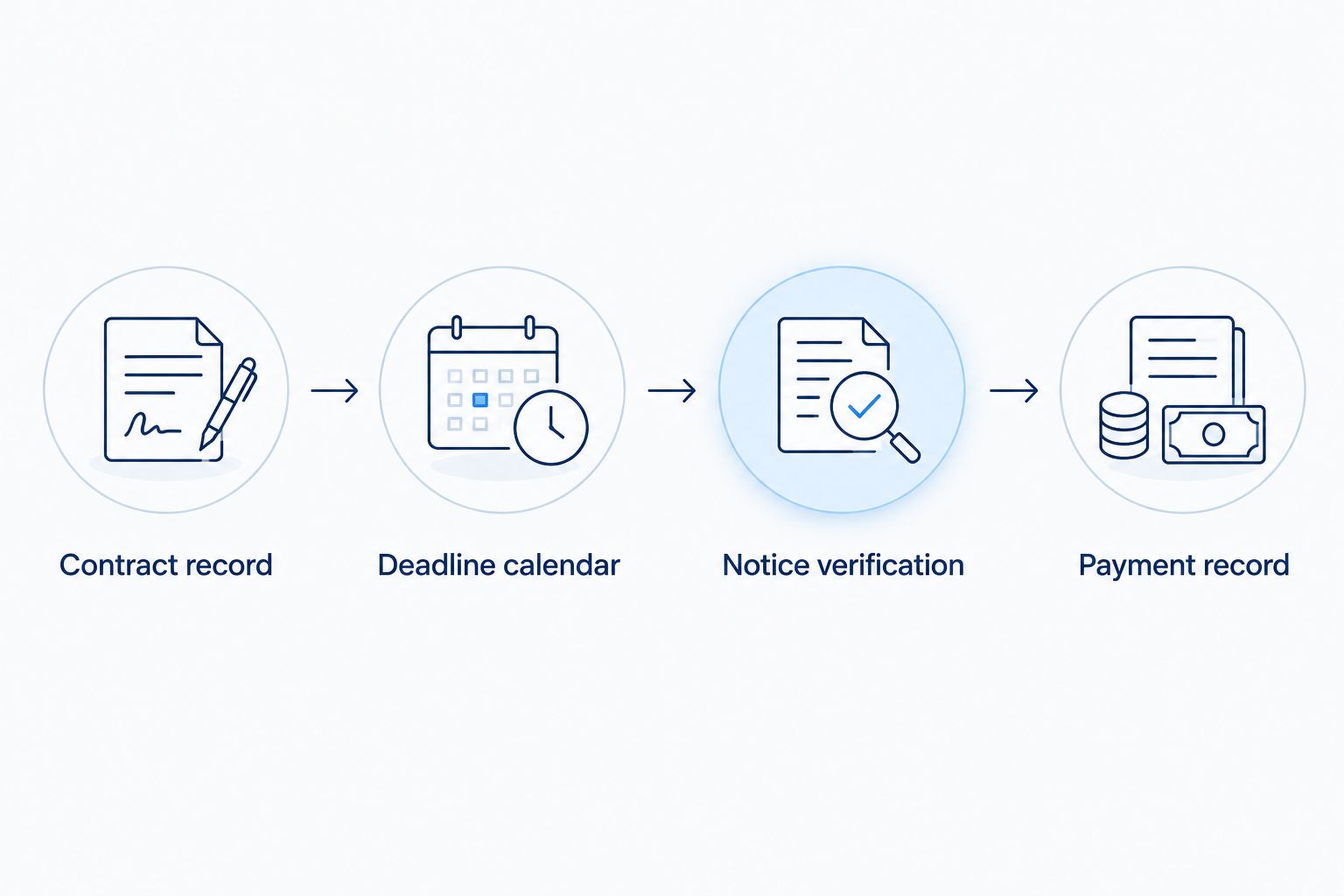
Payment record
A completed calendar event is not proof that the required recipient received your deposit. Close the loop with documentation.
- After making a payment through independently verified instructions, save the transfer confirmation in the secure document folder.
- Update Payment status to show that the transfer was initiated. Do not label the installment received solely because your bank shows an outgoing transfer.
- Obtain the appropriate receipt or acknowledgment from the party handling the deposit. Match it to the buyer, unit, installment, and contract obligation.
- Add the receipt location to Receipt reference and update the status to reflect the acknowledgment actually received.
- Retain 1 receipt reference per installment in the tracker. If a payment has multiple supporting documents, use a folder reference rather than leaving documents scattered across messages.
Expected result: your records distinguish payment initiation from acknowledged receipt. An unanswered receipt request remains visible instead of disappearing when a reminder is dismissed.
When you approach closing, reconcile the acknowledged deposits with the closing documents. Use the Miami condo offer-to-closing workflow to connect this deposit record with the broader purchase process.
Second variant: update the schedule when a milestone changes
The same tracker supports both fixed-date and milestone-triggered obligations. The difference is what permits you to activate or change the deadline.
| Workflow | Best for | Advantage | Limitation |
|---|---|---|---|
| Fixed-date tracking | Installments with an explicit contractual date | Lets you schedule preparation immediately | Still requires review if a valid amendment changes the obligation |
| Milestone-triggered tracking | Installments tied to a contract-defined construction event or notice | Keeps uncertain timing separate from confirmed deadlines | Requires document review before assigning the payment date |
Use fixed-date tracking for fixed dates and milestone-triggered tracking for milestones. Neither approach is a substitute for reading the agreement.
When a project update arrives in 2026, first determine whether it is informational or changes a contractual obligation. A progress photograph, general newsletter, or revised marketing timeline should not automatically alter the tracker.
For a verified change, retain the previous source, add the new supporting document, and record why the deadline changed. Then update the calendar and notify anyone responsible for arranging funds. Do not delete an earlier record merely because the latest update is easier to read.
If you want email notifications, use them to flag messages for review. Keep the review step between the incoming notice and any change to the payment schedule; avoid rules that interpret contractual language or approve transfers automatically.
Troubleshooting
An estimated date became a payment deadline
Remove the estimate from the verified-deadline field and label it as a planning assumption. Recheck the trigger wording and ask your attorney what establishes the actual deadline. Keep an internal follow-up reminder without presenting it as a contractual obligation.
Two documents show different schedules
Stop updating the calendar until the conflict is resolved. Preserve both documents and ask your attorney which agreement or amendment controls. Record that answer alongside the source; do not choose the later-looking document without reviewing its status.
The calendar reminder appeared on the wrong day
Check the event's date, time, and time zone against the verified obligation. Traveling buyers should review the saved event from their usual account rather than assuming the displayed local time matches the contractual requirement.
A deposit was sent, but no receipt arrived
Keep the installment marked as initiated rather than acknowledged. Contact the verified escrow or transaction contact, provide the transfer reference through an appropriate channel, and request confirmation. Do not send a second payment simply because the first acknowledgment is delayed.
A message contains changed wire instructions
Pause the transfer and independently verify the instructions through an established contact method. Do not use the new message's phone number as your sole verification route. If funds have already been sent to a suspected fraudulent destination, contact your bank immediately.
Customize your workflow
Expand the tracker without mixing unrelated obligations. Maintain separate records for deposits, financing tasks, document reviews, and closing preparation; a deposit installment should not serve as a reminder for every purchase task.
Carlos Morean can provide Miami condo purchase guidance while you coordinate the deposit record with your attorney and lender. Brokerage guidance does not replace either professional's review, and this organizational workflow does not establish escrow protections or refund rights.
For neighborhood research, define what you need to verify rather than assuming one Miami address works like another:
- Brickell: distinguish North Brickell from South Brickell when evaluating the building's location and your daily routes.
- Brickell Key: review the specific building documents and access arrangements rather than substituting information from a mainland Brickell project.
- Coconut Grove: check the project's exact address, surrounding uses, and the features described in its own documents.
- Coral Gables: confirm the property's actual jurisdiction and project-specific requirements; a marketing description is not a document review.
These research tasks belong beside the payment workflow, not inside its legal deadline fields. In your 2026 planning notes, distinguish verified property information from questions still awaiting an answer.
FAQ
How do I connect a pre-construction deposit schedule to a Miami condo purchase?
Create one tracker row for each contractual installment, then connect verified deadlines to calendar events and payment receipts. Keep milestone-triggered obligations undated until the contract and relevant notice establish the deadline.
Are all Miami pre-construction condo deposit schedules the same?
No single schedule should be assumed for every Miami pre-construction condo purchase. Use your executed agreement and applicable amendments rather than another project's sales materials.
Should I automatically pay a deposit when a reminder appears?
No. A reminder should prompt you to verify the obligation, funding arrangements, and payment instructions before sending money.
Does a construction delay automatically postpone my next deposit?
A construction update alone does not establish a revised deposit deadline. Ask your attorney to review the contract, relevant notice, and any amendment before changing the schedule.
How can Carlos Morean help with a Miami condo purchase?
Carlos Morean provides real estate brokerage guidance to Miami condo buyers. Your attorney handles legal interpretation of deposit terms, while your lender addresses financing requirements.
What should I save after sending a condo deposit?
Save the transfer confirmation and the appropriate receipt or acknowledgment identifying the payment. Keep initiation and acknowledged receipt as separate statuses until the supporting documentation is complete.
Can I use this workflow for a condo purchase starting in 2026?
Yes. Start with the documents governing your 2026 purchase and enter each obligation's actual date, including later years when applicable. Review the tracker whenever a relevant notice or amendment arrives.
One last thing
Keep a reminder for missing acknowledgment, not just for sending funds. A dismissed payment reminder can hide an unfinished task: proving that the correct installment was received and credited to the correct purchase.
Before closing, match every acknowledged deposit to the transaction documents. A clean calendar is useful; a traceable payment record is the stronger safeguard.